
FAQ
Find your desired topic quickly here:

Registration and Login
No, registration is not mandatory. You can also complete your order as a guest and only need to provide your name, address, and email address once. After clicking “Go to checkout” in your shopping cart, you can choose whether to log in to an existing customer account, create a new account, or continue as a guest without an account. For guest orders, your data is not stored permanently. If you decide to create a customer account — for example, to view previous orders — we of course treat your data with the utmost confidentiality. Further information can be found in our Privacy Policy.
After clicking “Go to checkout” in your shopping cart, you will be taken to a selection page. There, you can either log in to an existing customer account, register a new account, or continue as a guest without an account. If you would like to create a customer account, please follow the registration process during checkout.
Please first check whether you have entered the correct email address and password. If you no longer remember your password, please follow the instructions under “I have forgotten my password.” If the problem persists, please contact our customer service.
Please click on “Forgot password” on the login page and follow the instructions. We will then send you an email with a link to set a new password. If you do not receive the email, please check your spam folder.
If you have registered, all your settings are saved in your account. To change them, please log in to your account using the link displayed at the top right of the page. In your account, you can update your personal details, address, payment methods, or newsletter preferences.
Yes, you can place an order on behalf of a company. During registration, please select “Commercial” as the account type and enter your VAT Registration Number in the designated field. The VAT Registration Number will be processed automatically during checkout, and the invoice will be issued correctly.
The webshop is operated by Hanser Fachbuchverlag. Ordering, delivery, accounting, complaints, and customer service are handled by our service partner Verlegerdienst München. Please refer to the Terms and Conditions and the Privacy Policy for further details.
The e-book shop was operated via a service provider (Ciando, Mediengruppe Stein) with whom we no longer work. You can access your account here: (https://hanser-ebooks.ciando.com/)
You cannot delete your account yourself. Please contact our customer service by email at fachbuch@hanser.de, stating your name and email address. Confirmation of the deletion will only be provided if you explicitly request it.
If you wish to delete your (old) e-book account, please contact Datenschutz@Mediengruppe-Stein.de.
Titles that are out of print or were purchased more than five years ago can no longer be supported by customer service.
Ordering, Delivery and Payment
On the pages of the Hanser specialist book shop, you will find all books currently available for delivery. Once you have found a book you would like to purchase, add it to your shopping cart. After placing all desired titles in the cart, click on the shopping cart icon at the top right of the page. Your selection will be displayed again, allowing you to review it and make changes. To complete your order, please follow the individual checkout steps in the shopping cart.
Shipping within Germany is free of charge. Shipping costs for all other countries can be viewed here. No shipping costs apply to digital products (PDF, ePub).
You can pay for your order by invoice (up to a cart value of €199.99), SEPA direct debit, credit card (Visa and Mastercard), or PayPal. Digital products can only be purchased via PayPal or credit card and not by invoice or SEPA. Purchasing digital products on invoice is only possible upon request via customer service .
If your shopping cart contains books with a total value of €200.00 or more or if your cart contains a digital product, payment is only possible via SEPA, credit card (Visa and Mastercard), or PayPal. If you would still like to pay by invoice, please contact our customer service.
For printed books with the delivery status “available immediately,” the following delivery times apply:
- Germany: 2–5 working days
- Austria and Switzerland: 3–6 working days
- Rest of the world: 5–10 working days
For orders with the delivery status “available,” the title will be newly printed for your order as a POD (“print on demand”) title. It may take up to 14 working days for the book to be delivered to you from the printing facility. If the applicable delivery time for your address has already been exceeded, please contact our customer service.
For e-book orders: as soon as your payment has been accepted, you will receive an order confirmation and the download link by email within a few minutes.
As orders are generally processed very quickly, it is unfortunately not possible to make changes once the purchase process has been completed. Please refer here to our return policy.
Eine Lieferung an eine DHL Packstation ist grundsätzlich möglich (keine anderen Packstationen von Hermes oder Amazon) Füllen Sie dazu bitte die Felder unter „Ihre abweichende Lieferadresse“ aus. WICHTIG: die 8-stellige Postnummer und 3-stellige Packstationsnummer müssen UNBEDINGT in die richtigen Felder eingetragen werden.
- 8-stellige Postnummer ins gleiche Feld wie der Nachname, also nach Nachname
- 3-stellige Packstations-Nummer statt Straße Leerzeichen, Sonderzeichen dazwischen sind egal
Bitte tragen Sie die Angaben nach obiger Vorgabe, ansonsten kann die Lieferung nicht zugestellt werden.
You will receive an order confirmation by email immediately after submitting your order in the webshop — regardless of whether you ordered an e-book or a printed book.
You will receive the invoice for your e-book or printed book by email on the working day following your order.
Within the 14-day right of withdrawal applicable in Germany, you can return your purchased print book at your own cost.
If you have further questions, please contact our Customer Service in this case.
In this case, please contact our customer service.
Pre-ordering books with the delivery status “available for pre-order” is possible in our webshop. Your order will be recorded and shipped automatically as soon as the title becomes available—without further notification. Payment methods available for pre-orders are SEPA and invoice. You will receive an order confirmation with an amount of €0.00. Once the book is published, you will receive an invoice with the correct amount, and only then will the amount be debited from your account.
In the Hanser specialist book portfolio, we offer many titles in a “hybrid model,” combining a printed book with an included e-book. However, this is not the case for every title. This is independent of category, industry, or price and is based on individual agreements with the author and publisher.
The webshop is optimized for common browsers. Please check whether you are using the latest version of your browser and install any necessary updates. If in doubt, please contact our customer service.
Please enter your company’s address as the billing address and provide the correct legal company name.
At present, it is unfortunately not possible to enter a VAT ID (USt-IdNr.) directly in the webshop. Please send your order, including your VAT ID, to fachbuch@hanser.de. Your order will be processed manually, and an invoice will be issued.
Questions about e-books / ePub / Sample Chapters
An e-book is a book in electronic format. E-books can be read on e-book readers, mobile devices such as smartphones or tablets, as well as on PCs. The e-books available in our webshop are generally offered in PDF or EPUB format, which are internationally recognized standard formats for e-books. The available formats are listed on the respective e-book product page.
All e-book readers available in Germany — except for devices from the Amazon Kindle family — support PDF/EPUB formats. Common mobile devices and personal computers can also display these formats, provided that suitable reader software is installed.
To download and view e-books on your computer, the following requirements apply:
E-Books in PDF format
You will need software capable of opening PDF files. We recommend Adobe Acrobat Reader, which can be downloaded here: https://get.adobe.com/reader/
E-Books in EPUB format
To read our e-books in EPUB format, we recommend using Adobe Digital Editions, which supports EPUB and PDF e-books. You can learn more and download the software here: https://www.adobe.com/solutions/ebook/digital-editions.html
Our PDF e-books can be displayed on almost all e-book readers and can also be used on Apple iPads and Android tablets. A PDF e-book is displayed on screen in the same layout as the printed book.
E-PUB e-books are supported by a wide range of e-book readers in addition to Adobe Digital Editions. They are suitable for use on Apple iPads, Android tablets, iPhones, and Android smartphones. The E-PUB format allows the text to adapt dynamically to the screen size of the reading device.
No. Amazon Kindle uses its own proprietary formats (AZW/MOBI). The e-books available in our webshop are generally provided in e-PUB format, which is not compatible with Kindle devices. Of course, our e-books can be purchased from Amazon in Kindle-compatible formats.
Our e-books use so-called “social DRM,” a soft form of copy protection. In cases of unauthorized copying or distribution, the original owner of the e-book can be identified, helping to protect the rights of the authors and the publisher.
All PDF e-books and all e-PUB titles are protected by a personalized watermark. This does not result in any technical restrictions for you as a user.
Many printed books published by Hanser Fachbuch include a code that allows you to download the e-book edition (PDF) of the book. These titles are marked accordingly, either on the first pages of the printed book or in the product description in the Hanser Fachbuch webshop.
To download your e-book using an “E-Book inside” or “E-Book included” code, please enter the printed code—found on the first pages of your book—at the following website: https://plus.hanser.de/en. Please note that registration is required before entering the code.
Registration
xTo download an “E-Book inside” or “E-Book included” e-book, please register first at: https://plus.hanser.de/register and follow the registration process.
All e-book inside and e-book included codes can now only be redeemed via https://plus.hanser-fachbuch.de/register
A new registration is required. Previous login credentials from the former Hanser e-books platform are no longer valid.
The following payment methods are available for e-books and EPUBs: credit card or PayPal. Payment by invoice is only possible upon request via customer service.
You can select your preferred payment method during registration or ordering and change it at any time using the “Change” button. Your data is protected by encrypted SSL connections.
After a successful download, you will receive your invoice by email within approximately 1–3 days, and the purchase amount will be charged according to the selected payment method.
You only pay for e-books that are actually downloaded. If a download is interrupted due to technical issues or if you are unable to read the e-book online despite the availability of online access, the e-book will of course not be charged.
Please contact support@hanser-ebooks.de and ask for your titles to be made available for download again. We will be happy to assist you.
Please make sure you have registered in advance at: https://plus.hanser.de/en. Then enter your code carefully. Pay close attention to hyphens and similar characters such as “0” (zero) and “O” (letter O), or “1” (one) and “l” (lowercase L). If you still receive an error message, please contact fachbuch@hanser.de and include the code, book title, and ISBN.
If you purchased a printed book from a secondary reseller (e.g. TerraShop, Medimops, etc.) at a reduced price, it is possible that the “E-book inside” code has already been redeemed by the original owner. In this case, there is no entitlement to the e-book.
Please first check your spam folder and allow some time, as email delivery times may vary depending on your provider. If you have not received an email from Hanser after one day, please contact fachbuch@hanser.de to request the order confirmation or download link again. Please note that invoices are sent no earlier than one day after your order.
The appearance of sample chapters may differ from the printed version. The sample provided is taken from the e-book edition. The printed edition is usually produced in black and white.
Download
Immediately after completing your purchase, you will receive an email with a download option for the e-book you purchased. Please click the download button in the email. The e-book should then open automatically in the program you have set as the default for opening e-book / EPUB files. Please make sure that suitable software or an app capable of displaying e-book / EPUB files is installed on your computer or mobile device.
No. You must be online for the download process, but once the e-book has been successfully transferred to your reading device, you can read it without an internet connection.
No. However, saving and copying for personal use in a reasonable scope is permitted.
No, lending e-books is not permitted.
To allow us to provide your e-book via download immediately after purchase rather than only after the statutory withdrawal period has expired, you must waive your statutory right of withdrawal. Therefore, returns are not possible. You can find the withdrawal policy here.
Please check whether the email may have been delivered to your spam folder. If this is not the case, please contact fachbuch@hanser.de.
Please check whether you have an active internet connection. You may also need to adjust your browser settings. If the problem persists, please contact fachbuch@hanser.de.
There may be a technical issue. In this case, please contact fachbuch@hanser.de.
Your download link is valid for 180 days from the date of purchase and can be used up to three times on different devices. If your download link has expired, please contact fachbuch@hanser.de.
No. Passing on e-books to third parties or reproducing them in any form is not legally permitted. In cases of unauthorized copying or distribution, the original owner of the e-book can be identified, thereby protecting the rights of the authors and the publisher. All PDF E-Books and all EPUB titles are protected by a personalized watermark.
Questions about Adobe Digital Editions
Open the Adobe Digital Editions program. In the library view, your e-books are displayed either as cover thumbnails or in a list view. Double-click an e-book to open it.
Once you open an e-book for the first time with Adobe Digital Editions, it is stored on Windows systems under:Documents – My Digital Editions.
Yes, this is very easy to do. Open Adobe Digital Editions, switch to the library view, and select Library → Add Item to Library.
Yes, transferring your e-books to multiple devices is completely straightforward.
An Adobe ID is a user account with the software provider Adobe. It is created when you register online, purchase Adobe software online, or use an Adobe service such as Adobe Studio. An Adobe ID is only required if you want to borrow e-books, for example, from your local library. It is not required to use our e-books.
You can authorize all devices supported by Adobe Digital Editions. A list of supported devices can be found via the Help function in Adobe Digital Editions on the Adobe website.As mentioned above, authorization is not required to use our E-Books.
You can deauthorize your PC as follows: Open Adobe Digital Editions and use the keyboard shortcut Ctrl + Shift + D.
To deauthorize an E-Book reader: Start Adobe Digital Editions, connect the e-book reader to your computer, and then use the keyboard shortcut Ctrl + Shift + E.
Contact the Publisher
Write to us! Do you have questions about our authors and books? Do you want to share suggestions, comments, praise, or criticism? Let us know! We look forward to hearing from you.
If you have any further questions about shopping on our website or need assistance, please do not hesitate to contact us:
Mon-Thu: 9:00 am – 3:00 pm (MEZ)
Fri: 9:00 am – 2:00 pm (MEZ)
Carl Hanser Verlag GmbH & Co. KG
Kolbergerstr. 22
81679 München
FAQ for Lecturers
Registration for Lecturers / My Account
Register using your institutional address and your institutional email address via Studies → For Lecturers → Register, or via the following link: Register.
After you have completed the online form in full and provided details of your teaching activities, we will review your information. Once your details have been successfully verified, your account will be activated—only then will you be able to access the digital content.
Please note: Verification may take up to 2–3 business days.
Your institutional email address that you provided during registration serves as your login/username, along with the password you created yourself.
Please let us know by email at dozierendenportal@hanser.de which details you would like to change or if you wish to delete your account entirely.
In this case, please use the “Forgot password” function to set a new password.
Your institutional email address is your username.
Please email us at dozierendenportal@hanser.de with your institutional email address. We will update it in our system.
After registration, we first need to review your details before activating your account. You will receive an email once this has been completed.
If it still does not work, please contact us at dozierendenportal@hanser.de.
Resources for instructors
As a lecturer, you benefit from the following features:
- Free access to our textbook programme: You can access titles as online review copies (e-books) to read/stream online and evaluate them for use in your course.
- Access to all supplementary materials.
- Lecture slides for selected titles: Availability is indicated in the title description.
- Wishlist: Save interesting titles for later.
- Provide feedback: Rate titles and help us further develop our textbook programme.
- Updates: We will keep you informed regularly about new releases.
- Register as a lecturer or log in: Zur Registrierung / Zum Login
- Once you are logged in as a lecturer, you have free access to all current textbooks.
- Select the textbook you want and click on “Read book online”.
- Go to hanser-fachbuch.de and select the “Studies” tab. Under the Textbook Topics category, all textbooks are already filtered and sorted by subject area.
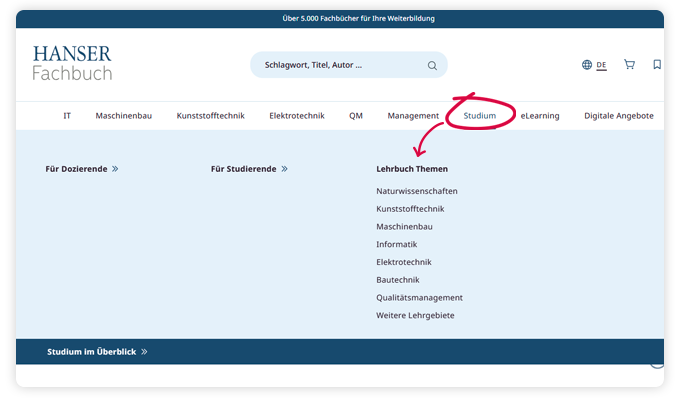
- Alternatively, for any product selection you can use the filter function “Filter products” and set the filter to “Is textbook” to access the lists of textbooks available for streaming.

Ja. Sie dürfen es aber nicht vervielfältigen, ins Internet oder Intranet stellen und sollten bitte dabei Folgendes beachten:
- Die Materialien unserer Website wie Abbildungen, Vorlesungsfolien oder Übungsaufgaben dürfen nur mit der korrekten Quellenangabe und dem Copyright-Vermerk des Hanser Verlags in Lehrveranstaltungen eingesetzt werden.
- Abbildungen und einzelne Ausschnitte (keine ganzen Kapitel, weniger als 15% des Buchinhalts) dürfen Sie direkt aus dem Buch entnehmen und in Vorlesungen zu Präsentationszwecken einsetzen, wenn sie die korrekte Quellenangabe sowie den Copyright-Vermerk des Hanser Verlags enthalten.
Yes. However, you may not reproduce them or make them available on the internet or intranet. Please also note the following:
- Materials from our website, such as images, lecture slides, or exercises, may only be used in teaching with proper source attribution and the Hanser Publishing copyright notice.
- Images and individual excerpts (not entire chapters, less than 15% of the book content) may be taken directly from the book and used in lectures for presentation purposes, provided they include proper source attribution and the Hanser Publishing copyright notice.
As part of our lecturer service, you receive free access to textbooks as well as eCampus courses. Professional/technical books are not included in the free lecturer access. You can purchase them via our specialist bookshop hanser-fachbuch.de or from your local bookshop.
After successful registration, log in at hanser-fachbuch.de. On the book’s detail page, under the “Read book online” button, you will find both the online review copy (PDF) and the supplementary materials available for that title.
Lecture slides for lecturers (if available) can be provided upon request.
Reviews and New Releases
Your feedback is important to us. We will send you a review form by email.
You are also welcome to send us your review at any time by email to: dozierendenportal@hanser.de.
If you would like to share your opinion with other readers, we would be delighted to receive your title reviews on the book’s detail page.
Your feedback contributes to the continuous improvement and further development of our textbooks. This way we can improve to meet the needs of students.
We will personally inform you by email about new releases in your subject areas. You can also always find all new releases on our website.
We also recommend subscribing to our textbook newsletter: http://newsletter.hanser.de
Contact
We hope this answers most of your questions. If any issues remain unresolved, please do not hesitate to contact us at any time.
Please send an email to dozierendenportal@hanser.de. Our service team is available Monday to Friday from 9:00 a.m. to 5:00 p.m.
Your Service Team for Lecturers
Hanser eCampus
You can purchase individual courses directly here in our Hanser Fachbuch Shop. Click here to view the eCampus courses.
We require email registration for online courses to manage identification, communication, access control, password recovery, and statistical analysis. This also applies to free demo access.
Please note that the course platform has privacy policies explaining how your personal data is processed. If you have any concerns about data protection, please see our privacy policy.
An adaptive learning platform is an online system that provides learning content tailored to the individual needs of each student. Based on the learner’s progress and input, the content is dynamically adjusted to support a more personalized learning experience.
An adaptive learning platform supports personalized learning by offering students content tailored to their knowledge level and learning preferences. It also makes learning more efficient by allowing them to progress at their own pace and address gaps in their understanding.
Yes, the adaptive learning platform allows students to monitor their individual learning progress. They receive feedback on their performance, completed tasks, and current level of knowledge so they can keep track of their development.
The adaptive learning platform is based on Hanser Verlag’s textbook program and provides a wide range of learning content in areas such as mechanical engineering, computer science, plastics, electrical engineering, mathematics, and management.
Yes, the adaptive learning platform is suitable for students of all experience levels. It adapts to their current level of knowledge and provides both introductory and advanced content to meet individual needs.
Yes, the adaptive learning platform can generally be accessed on various devices, including computers, tablets, and smartphones. This allows students to access the content flexibly from anywhere.
Students generally need an access code to use the adaptive learning platform. This code can either be obtained through their university library or purchased independently.
If you have not yet registered with Area9 Rhapsode™, please see the registration instructions.
If you are already registered with Area9 Rhapsode™, please see the login instructions.
